


How to improve home office lighting for professional video calls?
For over a decade in the remote work space, I've observed a common oversight that silently undermines professional credibility: inadequate lighting during video calls. It's a subtle but powerful factor that can make or break your virtual presence, often without you even realizing it.
Many professionals struggle with looking washed out, shadowed, or even obscured during critical online meetings. This isn't just about aesthetics; poor lighting can convey a lack of preparedness, hinder effective communication, and even impact how seriously your contributions are taken.
In this definitive guide, I'll walk you through a proven, actionable framework to dramatically improve your home office lighting for professional video calls. We'll move beyond simple fixes to implement expert-level strategies, ensuring you always present your best, most confident self on screen.
The Hidden Impact of Poor Lighting on Your Professional Image
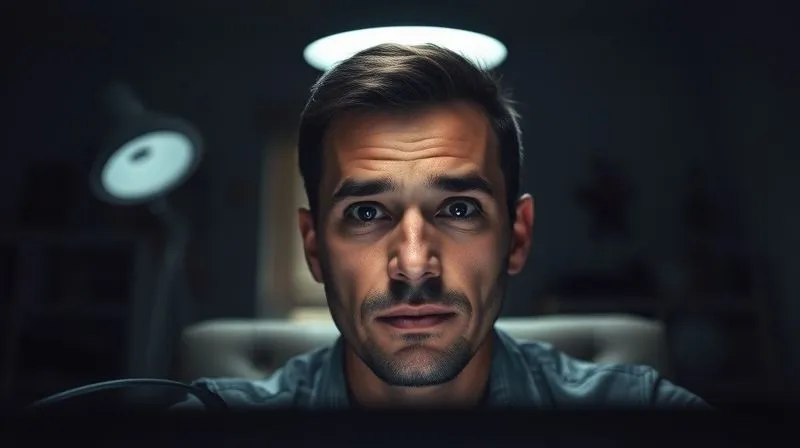
Think about the last time you saw a colleague appear as a silhouette or a grainy, poorly lit figure on a video call. Did it inspire confidence? Probably not. The visual impression you make online is often the first, and sometimes the only, impression you get to make.
More Than Just Brightness: Perception is Key
Good lighting isn't merely about having enough light; it's about having the right kind of light, positioned correctly. It sculpts your face, eliminates distracting shadows, and helps maintain eye contact by drawing attention to your expressions. Conversely, bad lighting can make you look tired, unapproachable, or even unprofessional.
“In the remote era, your screen presence is your professional handshake. Lighting is the firm grip and clear eye contact that conveys competence and trustworthiness.”
I've seen countless professionals unknowingly diminish their impact by neglecting this crucial element. It’s a silent barrier to effective communication and professional advancement in a world increasingly reliant on virtual interactions.
Step 1: Embrace the Power of Natural Light (When Possible)
Natural light is arguably the best and most affordable light source you have. It's soft, diffused, and provides a natural glow that enhances your features without harshness. However, harnessing it effectively requires strategic positioning.
Positioning Your Desk for Optimal Daylight
The key is to have the natural light coming from in front of you, or slightly to the side. Never have a window directly behind you, as this will create a distracting silhouette effect and make your face appear dark.
- Face the Window: Position your desk so you are directly facing a window. This ensures even, flattering light on your face.
- Side Lighting: If facing a window isn't feasible, place your desk perpendicular to it, allowing light to come from one side. You might need a secondary light source to balance shadows on the other side.
- Diffuse Harsh Sunlight: If direct sunlight is too strong, use sheer curtains or blinds to diffuse it. This turns harsh rays into soft, even illumination.
- Avoid Backlighting: Absolutely avoid having a window directly behind you. This creates a strong contrast that makes your face appear dark and undefined on camera.
Remember, natural light changes throughout the day. What works perfectly at 9 AM might be too dim or too harsh by 3 PM. Be prepared to adjust blinds or supplement with artificial light as needed. For more on ergonomic setup, including light considerations, you might find this resource helpful: OSHA's Computer Workstation eTool.
Step 2: Master the Three-Point Lighting System for Your Home Office
When natural light isn't enough or isn't available, a professional three-point lighting system is your best friend. This technique, borrowed from photography and filmmaking, ensures balanced, flattering light on your subject – which, in this case, is you.
Key Light: Your Primary Illuminator
The key light is your main light source. It should be positioned slightly to one side of your camera, elevated slightly above eye level, and pointing down at you. This creates gentle shadows that add definition to your face, preventing a flat, two-dimensional look.
Fill Light: Softening Shadows and Adding Depth
The fill light is positioned on the opposite side of your camera from the key light. Its purpose is to soften the shadows created by the key light, reducing their intensity without eliminating them entirely. It should be less powerful than your key light, or positioned further away, to maintain depth.
Back Light: The Secret to Separation and Professionalism
Often overlooked, the back light is crucial for separating you from your background. Placed behind you (out of frame) and slightly above, it creates a subtle rim of light around your shoulders and head. This adds depth, makes you 'pop' from the background, and gives a polished, professional studio look.
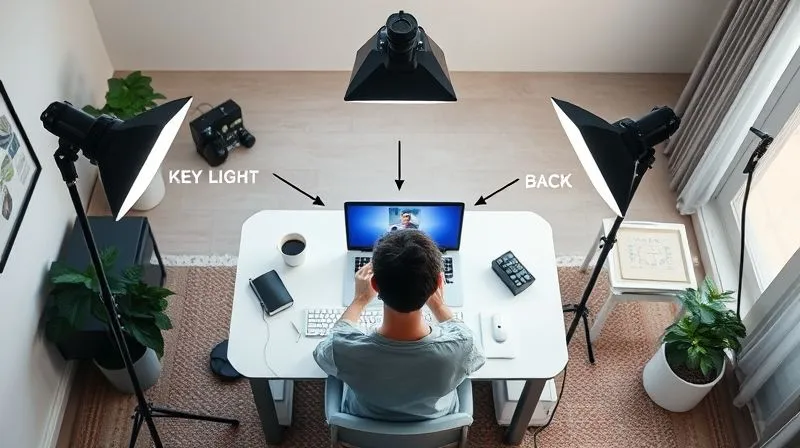
Implementing a three-point system doesn't require expensive studio equipment. You can achieve excellent results with a combination of desk lamps, ring lights, and even strategically placed floor lamps.
| Lighting Component | Purpose | Typical Equipment |
|---|---|---|
| Key Light | Main illumination, defines form | Ring light, softbox, powerful desk lamp |
| Fill Light | Softens key light shadows | Smaller desk lamp, LED panel, reflector |
| Back Light | Separates subject from background | Floor lamp, small LED light, accent lamp |
Step 3: Choosing the Right Lighting Equipment for Every Budget
You don't need to break the bank to achieve professional-grade lighting. The market offers a range of solutions, from budget-friendly options to more advanced setups. The goal is to find what works best for your space and your wallet to improve home office lighting for professional video calls.
Budget-Friendly Solutions: Ring Lights and Desk Lamps
- Ring Lights: These are incredibly popular for a reason. They provide a soft, even light that wraps around your face, minimizing shadows. Look for dimmable models with adjustable color temperature. They are excellent as a key light.
- Dimmable Desk Lamps: A good quality, dimmable desk lamp with a diffused shade can serve as an effective key or fill light. Position it carefully to avoid harsh spots.
- Reflectors: A simple white foam board or a dedicated photography reflector can bounce light back onto your face, acting as an inexpensive fill light.
Mid-Range Options: Softboxes and LED Panels
- Small Softboxes: These are essentially light sources encased in a diffusive material, creating a large, soft light source. A single small softbox can serve as an excellent key light, offering superior diffusion compared to a ring light.
- Dimmable LED Panels: Compact and versatile, LED panels offer precise control over brightness and color temperature. Many come with diffusers for soft light and can be used as key, fill, or back lights.
Professional Setups: Advanced Lighting Kits
- Two-Light LED Kits: For those seeking maximum control and flexibility, a kit with two adjustable LED panels or softboxes allows for a full key and fill light setup.
- Continuous Light Kits: These offer powerful, consistent illumination and often come with stands and various modifiers. While an investment, they provide studio-quality results.
When selecting any lighting equipment, prioritize models that offer dimmability and adjustable color temperature. These features are critical for fine-tuning your setup to match ambient light and your desired aesthetic. For a deeper dive into the physics of light, consider exploring resources from reputable photography schools or publications: B&H Photo Explora: Understanding the Basic Principles of Lighting.
Step 4: Fine-Tuning Your Setup: Color Temperature and Brightness
Once you have your light sources, the real magic happens in fine-tuning. This involves adjusting the color temperature and brightness to create a natural, professional look.
Understanding Color Temperature (Kelvin Scale)
Color temperature, measured in Kelvin (K), describes the 'warmth' or 'coolness' of light. Lower Kelvin values (2700K-3000K) produce a warm, yellowish light, similar to incandescent bulbs. Higher values (5000K-6500K) produce a cool, bluish light, like daylight. For professional video calls, aim for a neutral white light, typically around 4000K-5500K, which mimics natural daylight and makes you look alert and clear.
Brightness Control: Avoiding Overexposure and Glare
Too much light can be just as detrimental as too little. Overexposure can wash out your features, making you look pale or ghostly. Your goal is sufficient brightness to illuminate your face without creating harsh hotspots or making you squint. Use your webcam's preview window to monitor your appearance as you adjust. If your light sources are too direct, consider adding diffusion material (like a sheer cloth or tracing paper) to soften them.
“Consistency in color temperature across all your light sources is paramount. Mixing warm and cool lights can create an unnatural, distracting color cast on your face.”
Case Study: How Sarah Transformed Her Online Presence
Sarah, a freelance marketing consultant, always felt her video calls lacked polish. Her face often appeared shadowed, and her background was a blur. After reading about the importance of lighting, she invested in a dimmable ring light (her key light) and repurposed a small table lamp with a soft LED bulb (her fill light), positioning them carefully. She also placed a small LED strip behind her monitor as a subtle backlight.
The immediate result was striking. Sarah's face was evenly lit, her features were clear, and she appeared more vibrant and engaged. Clients commented on her professional setup, and she felt a significant boost in confidence, leading to more impactful presentations and ultimately, securing several new high-value contracts. This small investment in improving home office lighting for professional video calls paid dividends in her career.
Step 5: Overcoming Common Lighting Challenges
Even with the best equipment, you might encounter specific lighting hurdles. Here's how to tackle some common issues that can plague your video calls.
Dealing with Backlight Glare
If you can't avoid a window or bright light source behind you, try to minimize its impact. Close blinds or curtains partially, or hang a sheer fabric. Alternatively, significantly boost your key and fill lights to overpower the backlight, but be careful not to overexpose yourself.
Eliminating Harsh Shadows
Harsh shadows under your eyes or nose usually indicate your key light is too high, too low, or too direct. Experiment with raising or lowering your key light, and soften it with diffusion. Introduce or increase your fill light to lift those shadows, ensuring it's positioned opposite your key light.
Lighting for Glasses Wearers
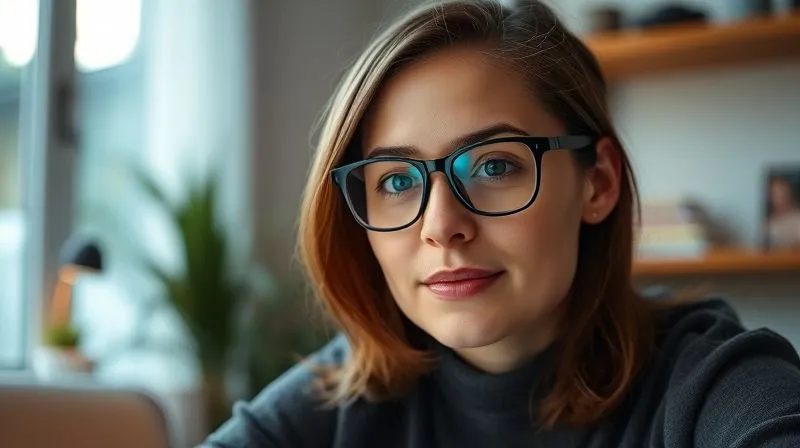
Glasses can cause reflective glare, making it hard for others to see your eyes. The trick is to adjust the angle of your key light. Try moving your key light slightly higher and further to the side. Sometimes, slightly tilting your glasses down or up can also help. The goal is to find an angle where the light reflects off the lenses away from the camera lens.
| Challenge | Solution |
|---|---|
| Window behind you | Close blinds/curtains, use strong key/fill lights, adjust camera exposure. |
| Harsh shadows on face | Soften key light with diffuser, add or strengthen fill light, adjust key light angle. |
| Glare on glasses | Move key light higher and further to the side, slightly adjust head/glasses angle. |
| Washed-out appearance | Reduce brightness of key/fill lights, check camera's white balance settings. |
| Dark, muddy background | Add a subtle backlight, use a small accent light to illuminate a plant or shelf in the background. |
Proactively addressing these common issues will significantly elevate your video call quality and contribute to a more professional online presence. For further tips on professional online etiquette, including visual presentation, consider resources like this: Harvard Business Review: How to Look Your Best on Video Calls.
Frequently Asked Questions (FAQ)
Q: Is a ring light always the best option for home office lighting? A: While ring lights are popular and effective for providing even, frontal light, they aren't always the 'best' for every situation. For truly professional results, combining a ring light (as a key) with a separate fill and backlight often yields superior depth and dimension. Softboxes or LED panels can also offer better diffusion and flexibility for a key light.
Q: How do I know what color temperature my lights should be? A: For most professional video calls, aim for a neutral white light between 4000K and 5500K. If you have natural light from a window, try to match its color temperature with your artificial lights. Many modern lights offer adjustable color temperature, allowing you to fine-tune it to your environment and preference.
Q: My background is distracting. Can lighting help with that? A: Absolutely! While decluttering is the first step, strategic lighting can further enhance your background. A subtle backlight helps separate you from the background, making you 'pop.' You can also use a small, low-power accent light to illuminate a specific, tidy part of your background, drawing attention there rather than to cluttered areas.
Q: How can I improve my home office lighting for professional video calls if I'm on a very tight budget? A: Start with natural light by positioning yourself facing a window. For artificial light, a simple dimmable desk lamp positioned slightly off-camera and diffused with a white cloth can work wonders as a key light. For a fill, use a white poster board to bounce light. A small, inexpensive LED strip light could serve as a basic backlight. Prioritize diffusion and positioning over raw power.
Q: My video calls look grainy or dark even with good lighting. What else could be wrong? A: If your lighting is good but your video quality is poor, the issue might be your webcam or your internet connection. Ensure your webcam is clean, up-to-date, and set to its highest resolution. A poor internet connection can also lead to lower resolution video streams to save bandwidth. Sometimes, adjusting your webcam's exposure settings manually can also help.
Key Takeaways and Final Thoughts
Mastering your home office lighting for professional video calls is no longer a luxury; it's a fundamental aspect of effective remote communication. By understanding and implementing these strategies, you're not just improving your aesthetics; you're enhancing your professional presence, boosting your confidence, and ensuring your message is received clearly and powerfully.
- Prioritize Natural Light: Position yourself to face a window whenever possible.
- Implement Three-Point Lighting: Use key, fill, and back lights for depth and professionalism.
- Invest Wisely: Choose dimmable lights with adjustable color temperature, fitting your budget.
- Fine-Tune for Perfection: Adjust brightness and color temperature for a natural, flattering look.
- Troubleshoot Common Issues: Learn to overcome glare, shadows, and challenges for glasses wearers.
Don't let poor lighting diminish your impact. Take these steps to refine your setup, and watch as your virtual interactions transform from merely functional to truly impactful. Your professional image deserves to shine, and with the right lighting, it absolutely will.
Recommended Reading
- Unraveling Data Mysteries: 5 Steps to Differentiate Correlation from Causation
- 7 Red Flags Angel Investors Spot in Early Startups (Avoid Them!)
- Unlock Project Success: How to Interpret KPIs for Actionable Insights
- Boost Sales Forecast Accuracy by 20%: Volatile Market Playbook
- Unlock the Secret: How to Successfully Commercialize Your New Product Idea



Comments
Leave a comment below. Your email will not be published. Required fields marked with *