


How to Photograph Reflective E-commerce Products Without Glare?
For over 18 years in the dynamic world of e-commerce, I've witnessed firsthand the profound impact of visual presentation. One of the most persistent and frustrating challenges I've seen businesses grapple with is the notorious problem of glare and unwanted reflections when trying to photograph reflective e-commerce products without glare. It’s a common pitfall that can sabotage even the most stunning items.
This isn't just an aesthetic issue; it's a direct threat to your bottom line. Harsh reflections obscure details, distort colors, and make a product look cheap or unappealing. Customers lose trust when product photos don't accurately represent the item, leading to higher return rates and abandoned carts. It's a silent killer of conversion.
But here's the good news: mastering reflective product photography isn't about expensive gear or secret techniques known only to a select few. It's about understanding light, applying proven methodologies, and a touch of patience. In this definitive guide, I'll share the actionable frameworks, real-world insights, and expert tips I've honed over decades to help you capture stunning, glare-free images that truly shine.
Understanding the Enemy: What Causes Glare and Reflections?
Before we can conquer glare, we must understand its origins. Glare isn't some random photographic anomaly; it's a predictable interaction between light, your product's surface, and your camera's lens. In my experience, most photographers jump straight to solutions without truly grasping the underlying physics, leading to inconsistent results.
The Nature of Light and Surfaces
Reflective surfaces, by their very nature, act like mirrors, bouncing back light from their surroundings. The smoother and more polished a surface, the more specular (mirror-like) the reflection. This means that anything in your environment—your lights, your camera, even you—can become an unwelcome guest in your product's reflection. Understanding this principle is the first step to control.
Common Glare Culprits: Unwanted Light Sources
The primary culprits are usually direct, hard light sources. This could be a bare studio strobe, an undiffused LED panel, a bright window, or even the flash on your camera. Each of these creates a concentrated point of light that, when reflected, appears as a harsh, blown-out spot on your product. Identifying these sources is crucial for effective mitigation.
Expert Insight: "Glare isn't just reflected light; it's reflected *uncontrolled* light. The secret to reflective photography lies in controlling every photon that touches your product."
The Foundation: Your Studio Setup for Reflective Items
A well-thought-out studio setup is your first line of defense against glare. You wouldn't build a house on sand, and you shouldn't attempt reflective product photography without a solid foundation. This is where strategic planning pays off in spades.
The Importance of a Light Tent or Diffusion Box
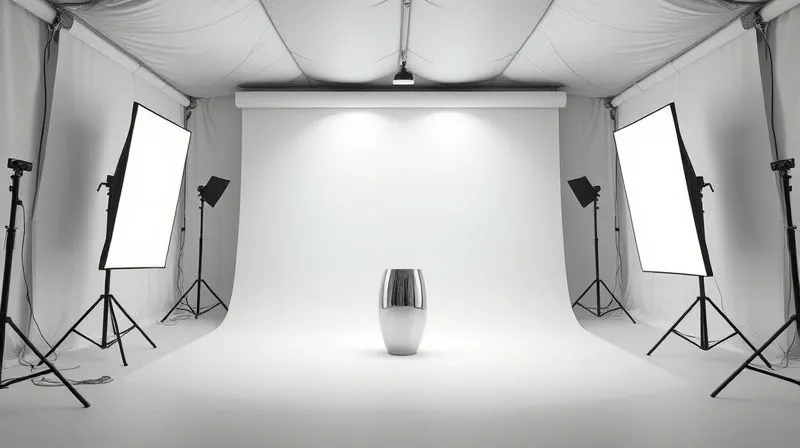
A light tent, also known as a light box or diffusion box, is perhaps the single most important tool for photographing reflective e-commerce products without glare. It surrounds your product with soft, even light from multiple angles, effectively diffusing any harsh light sources. This creates a uniform reflection across the product's surface, minimizing hot spots and revealing details.
Choosing the Right Background: Matte and Seamless
Just as important as the light tent is your background. Opt for a matte, seamless background, typically white or a neutral gray. A matte surface won't reflect light back onto your product, ensuring a clean, uninterrupted backdrop. Seamless paper or vinyl sweeps are ideal, as they eliminate distracting lines or textures.
Master the Light: Diffusion, Placement, and Angles
Once your foundation is set, the real artistry begins with light manipulation. This is where you transform harsh, direct light into soft, flattering illumination. This is the core skill I impart to every junior photographer I mentor.
Softboxes and Diffusers: Your Best Friends
Softboxes and diffusion panels are indispensable. They take a small, intense light source and spread it out, making it appear much larger and softer. The larger the light source relative to your product, the softer the shadows and reflections will be.
- Position Softboxes: Place large softboxes or diffusion panels on either side of your light tent, or if shooting without one, at a 45-degree angle to your product.
- Use White Reflectors: Opposite your main light source, use a large white reflector board to bounce some light back into the shadows, filling them in and reducing contrast.
- Overhead Diffusion: For highly reflective tops, consider a large diffusion panel above the product to create a soft, even overhead light.
Strategic Light Placement: The 45-Degree Rule and Beyond
The "45-degree rule" is a good starting point: position your main light source at a 45-degree angle to your product. However, for reflective items, you often need to go beyond. Experiment with placing lights further back, almost parallel to the camera, or even slightly behind the product (backlighting) to create edge highlights without direct glare.
Polarization Filters: The Magic Bullet for Reflections
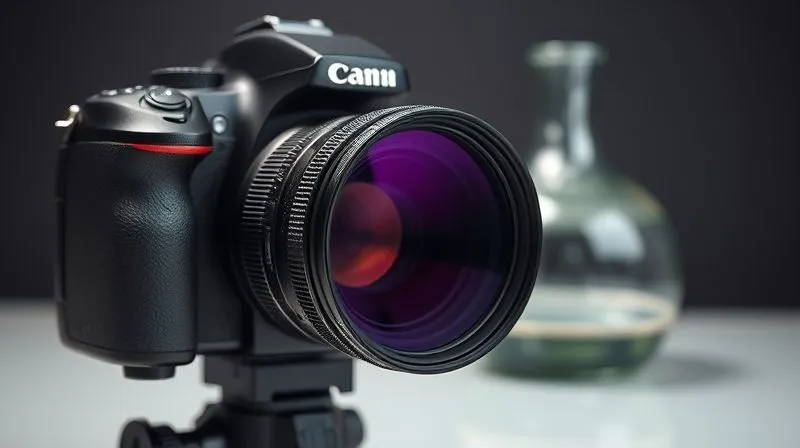
A circular polarizer (CPL) filter for your lens is a game-changer. Just like polarized sunglasses reduce glare on water, a CPL filter can dramatically reduce reflections on non-metallic surfaces like glass, plastic, and even some painted metals. You simply rotate the filter until the glare diminishes. It's truly a magical tool for how to photograph reflective e-commerce products without glare.
Camera Settings and Techniques for Glare-Free Shots
Even with perfect lighting, your camera settings play a crucial role in capturing the desired detail and avoiding blown-out highlights. This is where technical precision meets creative vision.
Aperture, Shutter Speed, and ISO: The Exposure Triangle
Aperture (f-stop): For product photography, you generally want a deep depth of field to ensure the entire product is in sharp focus. Aim for f/8 to f/16. This requires more light, so adjust your other settings accordingly.
Shutter Speed: With studio lights, your shutter speed will typically be dictated by your flash sync speed (often 1/125s to 1/200s). If using continuous lights, adjust to achieve proper exposure without blur.
ISO: Always keep your ISO as low as possible (e.g., ISO 100 or 200) to minimize noise and maintain image quality, especially critical for high-resolution e-commerce images.
White Balance: Neutralizing Color Casts
Reflective surfaces can easily pick up color casts from their surroundings. Set your camera's white balance manually using a gray card or custom white balance to ensure accurate colors. This is vital for customer satisfaction and reducing returns.
Focus Stacking for Ultimate Sharpness
For products with complex shapes or extreme depth, focus stacking can be incredibly beneficial. This technique involves taking multiple photos at different focal points and then combining them in post-production to create an image where everything from front to back is perfectly sharp. While not directly glare-related, it ensures that every detail, once free of glare, is crystal clear. Learn more about advanced photography techniques from resources like B&H Photo Explora.
Case Study: How Brilliant Baubles Eliminated Glare
Case Study: How Brilliant Baubles Eliminated Glare
Brilliant Baubles, a rapidly growing online jewelry store, faced a significant challenge with their polished silver and gold pieces. Customers frequently complained that the online photos didn't accurately represent the sparkle and detail, leading to a 30% return rate for perceived quality issues. They were struggling immensely with how to photograph reflective e-commerce products without glare.
By implementing the diffused lighting setup I described above, combined with strategic use of black cards for negative fill and a circular polarizer filter on their lens, they saw a dramatic transformation. Their photographers learned to sculpt light, not just illuminate. Within three months, Brilliant Baubles reduced their "product not matching photo" returns by 60% and experienced a 25% increase in conversion rates for their high-value reflective items. This resulted in a significant boost in their Q4 revenue and solidified their brand reputation.
Expert Insight: "Patience and meticulous attention to detail during setup will save you hours of frustrating post-production work. Get it right in-camera first."
Advanced Strategies for Challenging Reflective Products
Some reflective products present unique challenges that require a more nuanced approach. These are the items that truly test your mastery of light.
Shooting Glass and Transparent Objects
Glass and transparent objects don't just reflect; they also refract and transmit light. The key here is often backlighting. Placing a light source behind the product (diffused, of course) helps define its edges and highlights its form. Using a dark background can make the edges of clear glass pop, while light backgrounds might require rim lighting to create separation. Experiment with black cards to create subtle, dark reflections that give glass dimension.
Tackling Highly Polished Metals
Highly polished metals, like chrome or sterling silver, are essentially mirrors. They will reflect everything. This is where a completely controlled environment, like a large light tent or an infinity cove, becomes paramount. You want the reflections to be uniform and soft. Using large white or black cards (negative fill) strategically placed just outside the frame can sculpt reflections, adding depth and preventing flat, blown-out areas. For more on advanced lighting, consult resources like PetaPixel's lighting tutorials.
The "Invisible" Photographer Technique
Sometimes, your camera and even you can appear in the reflection. The "invisible photographer" technique involves shooting through a small hole in a large diffusion panel placed directly in front of the product. This ensures that the only reflection seen on the product is a large, soft, uniform white surface, eliminating unwanted elements.
| Material Type | Primary Challenge | Recommended Techniques |
|---|---|---|
| Polished Metal | Harsh reflections, hot spots | Large diffusers, black cards for negative fill, softboxes, polarization filter (for some finishes) |
| Glass/Transparent | See-through, edge definition, internal reflections | Backlighting, dark backgrounds, rim lighting, controlled highlights/shadows |
| Chrome/Mirror | Capturing entire surroundings, unwanted reflections | Infinity cove, controlled light tent, 'invisible' photographer technique, light shaping with flags |
| Glossy Plastic/Ceramic | Fingerprints, uneven reflections | Soft, broad light sources, careful handling, polarizer filter, clean environment |
Post-Production: The Art of Refinement (Not Replacement)
While the goal is to get it right in-camera, post-production is an invaluable tool for refining your images. It should enhance, not salvage, your product photos. Thinking about how to photograph reflective e-commerce products without glare also involves understanding that a little digital polish can go a long way.
Gentle Glare Reduction and Cloning
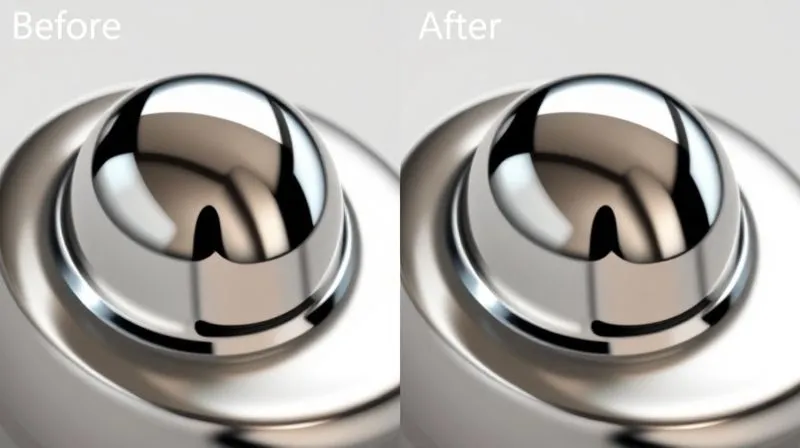
For any stubborn, minor glare spots that persist, tools like the clone stamp, healing brush, or patch tool in Photoshop can work wonders. However, use these sparingly and with a light hand. Over-editing can make a product look artificial or airbrushed, which undermines trust. The aim is subtle perfection, not digital fabrication.
Enhancing Contrast and Color Accuracy
Post-production is also your opportunity to fine-tune contrast, brightness, and color. Ensure your whites are pure, your blacks are rich, and your colors are true to life. This is where you can make your glare-free product truly pop off the screen. For robust tools and tutorials, consider Adobe's Creative Cloud suite.
When to Say No to Over-Editing
A common mistake I've observed is trying to "fix" major lighting issues in post-production. This is often a losing battle and results in unnatural-looking images. If a glare is too dominant or widespread, it's usually better to reshoot with better lighting rather than attempt a heavy-handed digital repair. Authenticity drives sales, not artificial perfection.
Common Mistakes and How to Avoid Them
Even seasoned photographers can fall into traps when shooting reflective objects. Learning from common missteps can save you time, effort, and frustration.
Relying Solely on Flash
Direct, on-camera flash is the archenemy of reflective surfaces. It creates harsh, pinpoint glare and often unflattering shadows. Always use diffused, off-camera lighting, or better yet, continuous soft lighting, when possible. If flash is your only option, bounce it off a large white surface or through a diffuser.
Overlooking the Environment
Remember, reflective surfaces are mirrors. A messy studio, a brightly colored wall, or even your own reflection can inadvertently appear in your product. Always ensure your shooting environment is clean, clutter-free, and ideally, neutral in color. This attention to detail is crucial for how to photograph reflective e-commerce products without glare effectively.
Skipping Test Shots
Never assume your setup is perfect on the first try. Take numerous test shots, review them critically on a large monitor, and zoom in to check for subtle glares or unwanted reflections. Adjust your lights, product position, and camera angles until you achieve the desired result. This iterative process is key to consistent quality.
Expert Insight: "The pursuit of perfection in product photography is a journey, not a destination. Embrace experimentation and continuous learning."
Frequently Asked Questions (FAQ)
Question? Can I photograph reflective products with just natural light?
Detailed answer: Yes, absolutely! Natural light, especially diffused light from a large window on an overcast day, can be excellent for reflective products. The key is to control it. Position your product near a window, use white foam boards to reflect light into shadows, and black cards to absorb unwanted reflections. Avoid direct sunlight, which is harsh and creates specular highlights. A sheer white curtain over the window can act as a giant diffuser.
Question? What's the most crucial piece of equipment for reflective product photography?
Detailed answer: If I had to pick just one, it would be a large, high-quality diffusion source. This could be a light tent, a large softbox, or a diffusion panel. The ability to soften and spread light is fundamental to controlling reflections. A circular polarizer filter comes in a very close second, especially for non-metallic reflective surfaces.
Question? How do I handle reflections of my own camera/self in the product?
Detailed answer: This is a very common issue. The best approach is often to use the "invisible photographer" technique: shoot through a small cutout in a large diffusion panel placed directly in front of the product. This ensures the reflection is a uniform, soft white. Alternatively, position your camera at an angle where its reflection is minimized, or use a long lens to increase your distance from the product. For very small items, sometimes shooting from a slightly higher angle can also help.
Question? Is it better to fix glare in post-production or prevent it during the shoot?
Detailed answer: Always, always, always prioritize preventing glare during the shoot. While minor glares can be cleaned up in post-production, attempting to fix significant reflections digitally is time-consuming, often leads to unnatural-looking results, and can degrade image quality. Getting it right in-camera saves immense time and produces a superior, more authentic final image. Think of post-production as polish, not repair.
Question? Are there specific camera lenses that help reduce glare?
Detailed answer: While the lens itself doesn't inherently reduce glare (that's the job of filters and lighting), certain lens characteristics can be beneficial. Lenses with excellent anti-reflective coatings can minimize internal lens flare, which is different from glare on the product but still important for image quality. More importantly, using a prime lens (fixed focal length) often provides sharper results than a zoom lens, which is crucial for capturing the fine details of reflective products. A macro lens is also invaluable for small, intricate items like jewelry.
Key Takeaways and Final Thoughts
Photographing reflective e-commerce products without glare might seem daunting at first, but with the right approach, it becomes a skill that elevates your brand and boosts your sales. Remember these critical points:
- Control Your Light: Diffusion is your most powerful tool. Large, soft light sources are key.
- Master Your Environment: A clean, neutral studio setup prevents unwanted reflections.
- Leverage Your Tools: Light tents, softboxes, and especially polarizer filters are indispensable.
- Prioritize In-Camera Excellence: Get the shot right during the shoot to minimize post-production headaches.
- Practice and Experiment: Each product is unique; don't be afraid to adjust and refine your techniques.
The visual appeal of your e-commerce products directly impacts customer perception and purchasing decisions. By applying these expert strategies, you're not just taking photos; you're crafting compelling visual narratives that build trust and drive conversions. Your journey to mastering reflective product photography starts now. Embrace the challenge, and watch your products truly shine!
Recommended Reading
- 7 Proven Steps: How Small Businesses Fix Low Website Conversion Rates
- 7 Urgent Steps: Navigate Unexpected Trade Sanctions in Foreign Operations
- 7 Proven Steps: Raise Small Business Prices & Keep Loyal Customers
- 7 Steps to Accurately Forecast & Manage Project Budget Deviations
- 7 Internal Barriers Preventing Disruptive Innovation in Large Firms




Comments
Leave a comment below. Your email will not be published. Required fields marked with *