


How to Validate Data Accuracy from Multiple Analytics Tools?
For over 15 years in the trenches of business analytics, I've seen countless companies invest heavily in sophisticated analytics platforms, only to stumble over a fundamental, often overlooked, issue: the inconsistency of their data. It's a silent killer, slowly eroding trust in insights and leading to decisions based on flawed premises. You might have Google Analytics telling one story, your CRM another, and your advertising platform a third. This isn't just frustrating; it's financially detrimental.
The pain of data discrepancies is real. Imagine presenting a critical marketing report, only to have a colleague challenge your numbers because their tool shows something entirely different. This not only undermines your credibility but also paralyzes strategic decision-making. In today's data-driven world, reliable data isn't a luxury; it's the bedrock of competitive advantage.
I understand this challenge deeply, and I'm here to guide you through it. In this definitive guide, I'll share my proven, 7-step framework on how to validate data accuracy from multiple analytics tools. We'll move beyond the theoretical and dive into actionable strategies, real-world examples, and expert insights to help you build a robust data validation process that ensures your insights are always trustworthy.
The Silent Killer: Why Data Discrepancies Undermine Your Business
Before we dive into the 'how,' it's crucial to acknowledge the 'why.' Why does validating data accuracy matter so profoundly? Because inaccurate data isn't just a minor inconvenience; it's a systemic risk. I've witnessed firsthand how a lack of consistent data can lead to misguided campaigns, wasted budgets, and missed opportunities. It erodes confidence from the C-suite down to the front-line teams.
Think about it: if your marketing team believes a campaign is performing well based on one tool, while another tool (the accurate one) shows it's failing, you're not just losing money; you're losing time and market share. This isn't an isolated incident; it's a pervasive problem. A study by Harvard Business Review highlighted that poor data quality costs U.S. businesses billions annually. The cost isn't just in direct financial loss but also in the opportunity cost of misallocated resources and delayed strategic pivots.
Moreover, the proliferation of analytics tools has only exacerbated this issue. Every department often has its preferred platform – marketing with Google Analytics or Adobe Analytics, sales with Salesforce, customer service with Zendesk, product with Mixpanel. While each tool offers specialized insights, their siloed nature and varying data collection methodologies often create a fragmented and contradictory view of your business performance. Our goal is to bridge these gaps and create a unified, trustworthy data narrative.
My Proven Framework: A 7-Step Approach to Data Validation
Over the years, I've refined a systematic approach to tackling data discrepancies. It's not about finding a magic bullet, but about implementing a disciplined framework that integrates into your daily operations. This isn't a one-time fix; it's a continuous commitment to data integrity. Here are the seven steps I advocate for effectively validating data accuracy from multiple analytics tools.
Step 1: Define Your Data Sources and Key Metrics
The first step in any data validation journey is to get a clear picture of your landscape. You can't validate what you don't fully understand. I always advise my clients to map out all their data sources and the specific metrics they track within each. This foundational exercise often reveals hidden complexities and redundant tracking efforts.
- Inventory All Analytics Tools: List every platform that collects data relevant to your business objectives. This could include web analytics (Google Analytics, Adobe Analytics), advertising platforms (Google Ads, Facebook Ads), CRM systems (Salesforce, HubSpot), email marketing tools (Mailchimp, Iterable), and more.
- Identify Key Business Metrics: For each tool, pinpoint the core metrics that drive your business decisions. For example, for a marketing team, this might be 'Sessions,' 'Users,' 'Conversions,' 'Conversion Rate,' 'Cost Per Click (CPC),' or 'Return on Ad Spend (ROAS).'
- Document Data Definitions: This is perhaps the most critical part of Step 1. How does Google Analytics define 'User' versus how your CRM defines 'Contact'? Are 'Conversions' counted the same way across your ad platform and your web analytics? Document these definitions meticulously. Small variations in definitions are a leading cause of data discrepancies.
- Establish a Single Source of Truth for Definitions: Create a centralized glossary or data dictionary that clearly articulates how each metric is defined, calculated, and what its intended purpose is. This becomes your organizational standard.
Step 2: Implement Consistent Tracking and Naming Conventions
Once you know what you're tracking, the next challenge is ensuring it's being tracked consistently across all platforms. In my experience, a lack of standardization here is a huge culprit for inaccuracies. Different teams often implement tracking independently, leading to a fragmented and unreliable data landscape.
- Standardize URL Parameters: For campaign tracking (e.g., UTM parameters), ensure a consistent structure and usage across all marketing channels. This means everyone uses the same `utm_source`, `utm_medium`, and `utm_campaign` conventions.
- Align Event Naming: If you're tracking custom events (e.g., 'button click,' 'form submission'), ensure the event names and their associated parameters are identical across all relevant analytics tools. For instance, if you have a 'Lead Form Submit' event in Google Analytics, it should ideally correspond to a similarly named event or goal in your CRM or advertising platform, if applicable.
- Review Tag Management System (TMS) Implementation: If you use a TMS like Google Tag Manager, ensure that tags are deployed uniformly across your digital properties. This helps centralize and standardize your tracking codes.
- Regular Audits of Tracking Codes: Periodically audit your website and apps to ensure tracking codes are correctly implemented and firing as expected. Tools like Google Tag Assistant or browser developer consoles are invaluable here.
Step 3: Leverage a Centralized Data Layer or Tag Management System
For businesses with multiple analytics tools, a common data layer or a robust Tag Management System (TMS) isn't just a convenience; it's a necessity for maintaining data integrity. It acts as the central nervous system for your data collection.
A data layer is a JavaScript object that sits on your website and contains all the data you want to collect and pass to various analytics tools. Instead of each tool trying to scrape information independently, they all pull from this single, standardized source. This dramatically reduces the chance of discrepancies caused by different tools interpreting the page content differently.
Similarly, a TMS like Google Tag Manager (GTM) or Tealium allows you to deploy and manage all your tracking tags from a single interface, without needing to modify your website's code directly. This centralization ensures that changes to tracking – like updating an event name or adding a new pixel – are applied consistently across all tools that rely on that data.
Expert Insight: "A well-implemented data layer is the closest you'll get to a 'single source of truth' for front-end data collection. It forces discipline and consistency, which are priceless when you're trying to validate data accuracy from multiple analytics tools."
I always recommend investing in a proper data layer strategy early on. It pays dividends in accuracy, flexibility, and reduced development overhead. For more on GTM best practices, consult Google's official developer guide.
Step 4: Conduct Regular Audit Trails and Reconciliation Checks
Even with the best preparation, discrepancies can creep in. That's why regular auditing and reconciliation are non-negotiable. This is where you actively compare data points from different sources to identify and investigate inconsistencies.
- Daily/Weekly Spot Checks: Pick a few key metrics (e.g., total sessions, conversions) and compare their values between your primary analytics tools on a daily or weekly basis. Look for significant deviations (e.g., more than 5-10% difference, depending on your tolerance).
- Dimension-Specific Comparisons: Don't just look at totals. Compare metrics broken down by dimensions like 'Source/Medium,' 'Device Category,' or 'Landing Page.' Discrepancies often hide in these granular views.
- Segmented Data Analysis: Apply segments (e.g., 'New Users,' 'Mobile Traffic') to your data and compare results across tools. This helps isolate the origin of inconsistencies.
- Record Discrepancies and Resolutions: Maintain a log of all identified discrepancies, their potential causes, and the steps taken to resolve them. This builds a valuable knowledge base for future troubleshooting.
Case Study: How Apex Innovations Tackled Conversion Discrepancies
Apex Innovations, a rapidly growing SaaS company, was struggling with a persistent 20% discrepancy in conversion numbers between their Google Analytics and their internal CRM. Marketing was celebrating high conversion rates, while sales saw lower numbers of qualified leads in their system. This created internal tension and misaligned expectations.
By implementing a rigorous audit trail as described above, I helped them discover the issue: Google Analytics was tracking a 'conversion' upon form submission, but their CRM only registered a 'qualified lead' after an internal review process and a secondary action. The definition of 'conversion' was different. By standardizing the definition and adjusting GA tracking to fire only after CRM qualification, they aligned their data. This resulted in improved internal trust, more accurate lead forecasting, and a 15% increase in marketing budget efficiency as they now focused on truly qualified leads.
Expert Insight: "Never assume your tools are perfectly aligned. They are built by different companies, for different purposes. Your job is to make them sing in harmony for your business context."
Step 5: Utilize Data Visualization and Comparison Tools
Manually comparing spreadsheets is tedious and error-prone. Visualizing data from multiple sources side-by-side can quickly highlight discrepancies that might otherwise go unnoticed. This is where modern BI tools shine.
I often recommend using tools like Google Data Studio (now Looker Studio), Tableau, or Power BI to create dashboards that pull data from your various analytics platforms. By placing key metrics from different sources next to each other in charts or tables, you can visually identify variances. For example, a line chart showing 'Sessions' from Google Analytics overlaid with 'Website Visits' from your CRM can quickly reveal if there's a significant divergence over time.
The human eye is incredibly good at pattern recognition. Leverage this by creating clear, concise visualizations. Don't just dump raw numbers; present them in a way that makes comparisons intuitive. This also democratizes data validation, allowing more team members to spot potential issues.
When discrepancies are found, these tools can also help you drill down. For example, if total sessions differ, you can then break it down by source, device, or geographic region to pinpoint where the divergence begins.
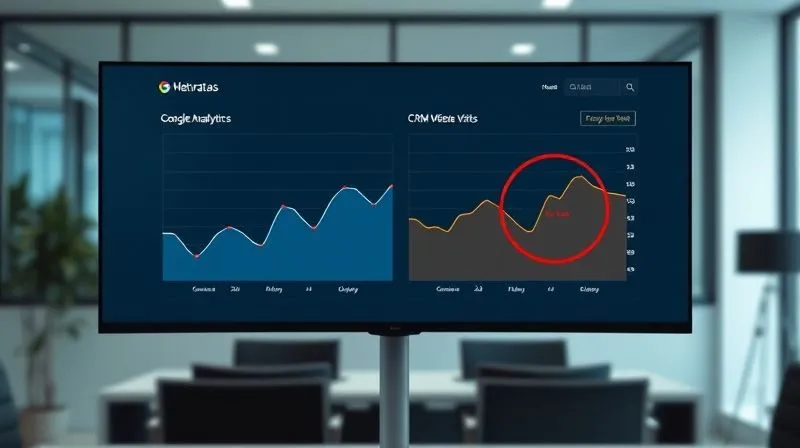
Here’s a simplified example of how you might compare data points from different tools:
| Metric | Google Analytics (GA) | CRM (Website Visits) | Discrepancy | Notes |
|---|---|---|---|---|
| Sessions | 100,000 | 85,000 | 15% (GA higher) | CRM only counts logged-in users. |
| Conversions | 2,500 | 2,000 | 20% (GA higher) | GA tracks all form submissions; CRM tracks qualified leads. |
| Bounce Rate | 45% | Not applicable | N/A | Metric not directly comparable. |
Step 6: Establish Clear Data Governance and Ownership
Technical solutions are only half the battle. The other half is organizational. Without clear data governance, even the best tools and processes will eventually fail. I've observed that many data accuracy issues stem from a lack of accountability and clear ownership.
- Form a Data Governance Committee: Create a cross-functional team with representatives from marketing, sales, product, IT, and analytics. This committee's role is to define data policies, standards, and procedures.
- Assign Data Owners: For each critical metric and data source, designate a specific individual or team as the 'data owner.' This owner is responsible for the accuracy, quality, and definition of that data.
- Document Data Flows: Visually map out how data flows from its origin (e.g., website interaction) through various tools (e.g., GA, CRM) to its final destination (e.g., dashboard, report). This helps identify potential points of failure or transformation issues.
- Implement Data Quality Policies: Develop formal policies for data entry, data cleansing, and data validation. These policies should be communicated and enforced across the organization.
As Forbes has highlighted, robust data governance is fundamental to building a data-driven culture. It transforms data from a mere byproduct into a strategic asset, ensuring that everyone understands their role in maintaining its integrity.
Step 7: Automate Where Possible, Monitor Continuously
While manual spot checks are essential, relying solely on them isn't scalable. Modern analytics infrastructure allows for significant automation in data validation and monitoring. This is where you leverage technology to proactively identify and flag discrepancies.
- Automated Alerts: Set up automated alerts in your BI tools or through custom scripts that notify you when a key metric in one tool deviates significantly from the expected range or from its counterpart in another tool. For example, if 'Sessions' in Google Analytics suddenly drops by 20% compared to 'Website Traffic' in your server logs, you should get an immediate notification.
- Data Reconciliation Scripts: Develop custom scripts (e.g., Python, R) that automatically pull data from various APIs (Google Analytics API, CRM API) and perform reconciliation checks. These scripts can run daily, compare defined metrics, and generate reports on discrepancies.
- Regression Testing for Tracking Changes: Whenever you deploy new tracking code or make significant website changes, conduct regression testing. This ensures that existing tracking hasn't been inadvertently broken.
- Continuous Monitoring Dashboards: Create a dedicated 'Data Health' dashboard that displays the status of your data validation checks. This provides an at-a-glance view of your data quality across all critical systems.
Automation doesn't replace human oversight, but it augments it, allowing your team to focus on investigating and resolving issues rather than just finding them. It's about shifting from reactive firefighting to proactive maintenance.

A simple discrepancy log, which can be automated, might look like this:
| Date Detected | Metric | Tool 1 (GA) | Tool 2 (Mixpanel) | Discrepancy (%) | Status | Assigned To |
|---|---|---|---|---|---|---|
| 2023-10-26 | Total Users | 150,000 | 130,000 | 13.3% | Investigating | Analytics Team |
| 2023-10-25 | Email Signups | 2,500 | 2,480 | 0.8% | Resolved | Marketing Team |
| 2023-10-24 | Product Page Views | 75,000 | 74,500 | 0.7% | Closed (Acceptable) | N/A |
Common Pitfalls and How to Avoid Them
Even with a robust framework, there are common traps I've seen businesses fall into when trying to validate data accuracy from multiple analytics tools:
- Ignoring Small Discrepancies: "It's just 5%, no big deal." Small discrepancies can compound over time or indicate a larger underlying issue that will eventually manifest as a significant problem. Address them early.
- Lack of Documentation: Without clear definitions and a log of past issues, you're doomed to repeat mistakes. Document everything.
- Blaming the Tool: While tools can have bugs, more often than not, discrepancies stem from implementation errors, definition mismatches, or user error. Assume it's an internal process issue first.
- Expecting 100% Alignment: Perfect alignment is often an unattainable and unnecessary goal. Focus on acceptable thresholds (e.g., within 2-5% variance for certain metrics) and understand the inherent differences in how tools collect and process data.
- Siloed Efforts: Data validation is not an analytics team's sole responsibility. It requires cross-functional collaboration and buy-in from all stakeholders who use the data.
Frequently Asked Questions (FAQ)
Question: What's an acceptable level of data discrepancy between tools? The acceptable level of discrepancy largely depends on the metric and the business context. For high-volume metrics like sessions or pageviews, a 3-5% variance might be acceptable, given different tracking methodologies (e.g., bot filtering, cookie blocking). For critical conversion metrics, you should aim for much tighter alignment, ideally below 1-2%. The key is to define these thresholds proactively and understand the reasons behind any consistent variance.
Question: How often should I perform data validation checks? For critical, high-impact metrics, daily or weekly spot checks are advisable. For less critical data, monthly or quarterly audits might suffice. Automated monitoring systems should run continuously, providing real-time alerts for significant deviations. The frequency should be balanced against the resources available and the potential impact of inaccurate data.
Question: My tools have different definitions for the same metric (e.g., 'Users'). How do I reconcile this? This is a very common challenge. The first step is to document these differing definitions precisely. Then, decide on a single, standardized definition for your organization. You might need to adjust your tracking implementation in one or more tools to align with this standard, or, if direct alignment isn't possible, create a transformation layer in your data warehouse or BI tool to map the differing definitions to your chosen standard. Always prioritize understanding the 'why' behind the difference.
Question: Can I achieve 100% data accuracy across all tools? Achieving 100% perfect data accuracy across all disparate analytics tools is often an unrealistic and overly ambitious goal. Different tools use varying collection methods, attribution models, cookie policies, and processing logic. Your goal should be to achieve a high level of accuracy that inspires confidence and enables reliable decision-making, while understanding and quantifying any remaining, acceptable discrepancies. Focus on minimizing critical errors and aligning key business metrics.
Question: What role does a data warehouse play in validating data accuracy? A data warehouse is immensely valuable. It acts as a centralized repository where you can ingest raw or transformed data from all your analytics tools. By consolidating data, you can apply consistent cleansing, transformation, and aggregation rules. This allows you to create a 'single source of truth' for reporting, making it easier to compare and validate data against consistent definitions and structures, rather than trying to reconcile directly between disparate source systems.
Key Takeaways and Final Thoughts
- Data accuracy is non-negotiable: Inaccurate data costs money, erodes trust, and leads to poor decisions.
- Start with definitions: Aligning how key metrics are defined and tracked across all tools is foundational.
- Implement a systematic framework: My 7-step approach provides a clear path to building a robust validation process.
- Leverage technology: Use TMS, data layers, BI tools, and automation for efficiency and scalability.
- Foster a data governance culture: Assign ownership and establish policies to ensure ongoing data integrity.
- Continuous effort, not a one-time fix: Data validation is an ongoing commitment that requires vigilance and continuous improvement.
Mastering how to validate data accuracy from multiple analytics tools is not just a technical challenge; it's a strategic imperative. By adopting these principles and committing to a disciplined approach, you won't just improve your numbers; you'll transform your organization into a truly data-driven powerhouse. Trust in your data empowers confident decision-making, fuels innovation, and ultimately drives sustainable growth. Start today, and build the foundation for unwavering data confidence.
Recommended Reading
- Team Rejects Crucial Shifts? 7 Expert Steps to Navigate Organizational Change
- Convert Networking Contacts: 7 Steps to Consistent Client Conversion
- 7 Proven Ways Remote Managers Prevent Isolation & Boost Engagement
- Why Isn't My Small Business Website Converting? 7 Actionable Fixes
- 7 Proven Steps to Optimize Small Business Cash Flow During a Recession





Comments
Leave a comment below. Your email will not be published. Required fields marked with *